
INTEGRATED PAY APPLICATION
Designed for construction owners, CIPO centralizes payment applications and provides real-time cost tracking to ensure accuracy, transparency, and disciplined financial oversight.
CIPO helps owners manage and approve contractor payments on a single platform, with optional integrations with systems such as Workday and SAP for real-time cost tracking.

Lean Operations
CIPO is designed to help owners standardize and automate financial workflows without losing control. The Pay Application process begins with an owner-approved Schedule of Values and then automates progress payments—delivering real-time cost visibility, accuracy, and efficiency throughout the project.
Define
Feel free to utilize the ready-to-use Pay App templates or modify CIPO to align with your organization's specific needs as required.
Automate
Empower yourself with robust and customizable workflows to handle pay requests effortlessly; no matter the complexity, CIPO can adapt.
Import
Establish your organization's payment categories and seamlessly import your SOVs from Excel or cost-loaded schedules, such as Primavera.
Track
Monitoring your project expenses, including change orders and quantities in detail, guarantees clarity and precision in progress payments.
Did you know?
Built for construction owners, CIPO supports multi-vendor payment tracking to ensure transparency, accuracy, and compliance with project-specific reporting requirements.
How it works?
Contractors and consultants submit payment requests through CIPO, triggering an owner-defined approval workflow. Payments are validated against the owner-approved Schedule of Values and authorized change orders—ensuring accuracy, governance, and configurable controls at every step.
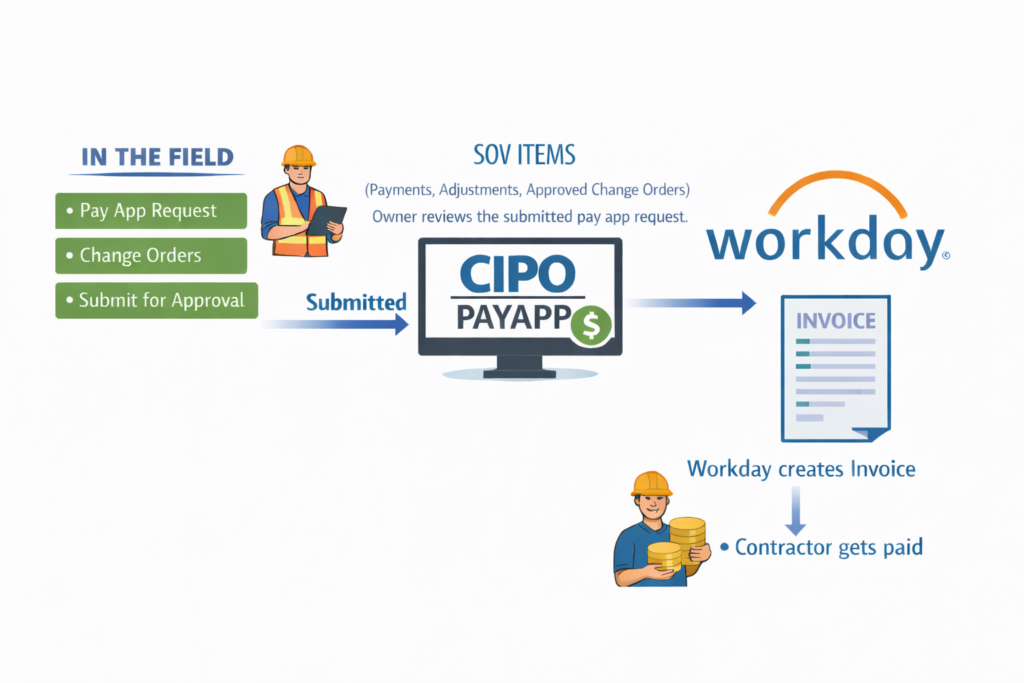
REduce manual processes. Avoid errors.
Owner-Controlled Ecosystem & Financial Visibility
CIPO enables an owner‑controlled ecosystem of connected solutions. By integrating directly with systems like Workday, CIPO eliminates redundancy and delivers real‑time insight into cost and performance across the field, the office, and the enterprise. See a sample Workday integration on the left.